Akshay 🚀 (@akshay_pachaar)
2025-02-02 | ❤️ 327 | 🔁 49
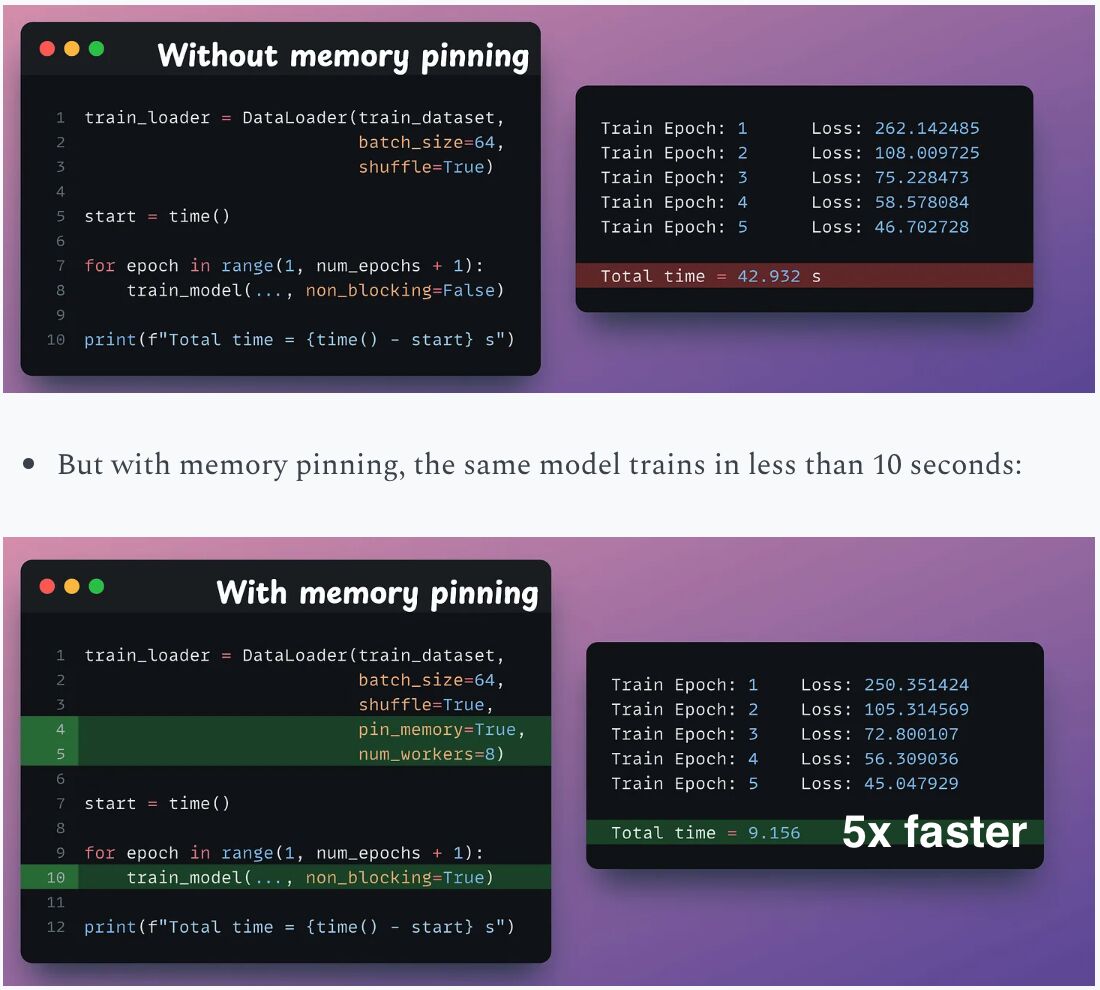
Make data loading in PyTorch 5x faster!
Typically, while training on GPUs:
- .to(device) transfers the data to the GPU.
- And everything executes on the GPU afterward.
This means when the GPU is busy, the CPU is idle, and vice versa. However, you can optimize this with memory pinning.
Here’s how it works:
— As the model trains on the first mini-batch, the CPU can transfer the second mini-batch to the GPU.
— This ensures that the GPU doesn’t have to wait for the next mini-batch once it completes processing the current one.
Enabling this is super simple:
- Set pin_memory=True in the DataLoader object.
- During data transfer, use: .to(device, non_blocking=True)
Additionally, specify num_workers in the DataLoader object for further optimization.
The speedup is clear from the image below.
Let me know in the comments what training optimisations have you done and are lesser known.
Find me → @akshay_pachaar ✔️ For more insights and tutorials on AI and Machine Learning!
미디어
🔗 Related
Auto-generated - needs manual review